Introduction: The Paradox of Choice
There are now over 10,000 AI tools on the market. Every day, new platforms emerge claiming to revolutionize marketing. Every inbox fills with promises of productivity, automation, and growth. The result? Most founders and marketing managers are completely paralyzed.
They’re overwhelmed by endless options. They’re wasting thousands on subscriptions they barely use. They’re chasing shiny objects instead of building systems. And they’re watching their competitors pull ahead while their own marketing machine remains fragmented, disconnected, and inefficient.
Here’s the hard truth most marketers don’t want to admit: Buying a gym membership doesn’t make you fit. Showing up consistently does. The exact same principle applies to AI tools. Owning the latest software doesn’t fix your marketing—the workflow does.
(see the generated image above)
The Theory Co has spent years stress-testing hundreds of tools. We’ve integrated them, debugged them, and measured real business outcomes across dozens of client accounts. What we discovered isn’t revolutionary, but it’s powerful: the best marketing stack isn’t about having more tools—it’s about having the right tools working together.
This isn’t a generic listicle of “Top AI Tools 2025.” This is the exact operating system we deploy for every agency client. This is the stack that powers $10M brand growth. This is what actually works—and critically, why it works.
Understanding the AI Marketing Stack Architecture
Before diving into individual tools, it’s crucial to understand the philosophy behind building an effective tech stack. A proper AI marketing stack isn’t a collection of random, trendy tools. It’s a coherent system where each component plays a specific role in your growth engine.
Think of it like building a car. You don’t just buy the best engine, the best transmission, the best tires, and the best paint separately and hope they work together. You architect a system where every component is engineered to work with the others, where data flows predictably, and where the whole becomes exponentially greater than the sum of its parts.
The Stack Pyramid Architecture
Our AI marketing stack follows a three-layer pyramid hierarchy:
Base Layer—The Central Brain: Your CRM is the foundation. HubSpot, Pipedrive, or Monday.com serves as the single source of truth for all customer data. This layer captures everything: where leads came from, what they engaged with, their entire journey, and ultimately, whether they converted.
Middle Layer—The Production Engine: AI writing tools (Jasper), design platforms (Leonardo.ai), and SEO intelligence (SurferSEO) generate the actual content and assets. These tools transform your strategic direction into publishable, optimized materials.
Top Layer—The Distribution & Optimization: This is where your content reaches people. Ranking systems, paid ad platforms, and social channels distribute your message to the right audience at the right time.
The Connective Tissue—Automation: Make.com and Zapier connect all these layers so data flows seamlessly. When a lead fills a form in your CRM, it automatically triggers content creation, personalization, and email sequences—all without manual intervention.
This architecture ensures three critical outcomes:
- No lead data gets lost. Every touchpoint is tracked.
- No content goes unoptimized. Every asset is analyzed and refined.
- No opportunity falls through the cracks. Every customer interaction is automated and coordinated.
Layer 1: The Central Brain – HubSpot CRM
Why This Layer Matters Most
If AI is the engine, CRM is the operating system. Without a proper CRM foundation, AI tools become expensive toys that generate content nobody tracks, for audiences nobody understands, with results nobody measures.
A modern CRM isn’t just a contact database. It’s an intelligence platform that automatically collects every piece of customer data: where they came from, which pages they visited, when they opened your emails, how long they spent on your pricing page, whether they downloaded your resources, and ultimately, whether they became customers.
This intelligence is the fuel that makes all downstream AI tools actually work.
The HubSpot Advantage
HubSpot excels at one thing above all else: creating a single source of truth. When a prospect visits your website, that event is automatically logged. When they click your email, when they view your pricing page, when they add items to a demo request—every action creates a data point.
The Sales Hub ($50-$150/month per user depending on tier) provides what we call “lead pipeline intelligence.” Here’s how it works in practice: A prospect downloads your whitepaper. HubSpot captures this. They visit your website 3 days later. HubSpot alerts your sales team. They read your pricing page without engaging. HubSpot flags this as “cold interest” and adjusts the sales workflow accordingly.
The Agency Insight: “We don’t let leads slip through the cracks. If a prospect visits the pricing page, HubSpot alerts our sales team instantly. This alone converts 2-3 additional deals per month per account manager.”
Multi-Touch Attribution: The Hidden Superpower
Most marketers only look at the “last click”—the final touchpoint before a conversion. This is why they overspend on retargeting ads and underinvest in educational content. HubSpot’s multi-touch attribution changes everything.
With proper setup, you can see the entire customer journey:
- Prospect sees your LinkedIn ad (Touchpoint 1)
- Clicks to your blog post (Touchpoint 2)
- Reads 5 more blog posts (Touchpoints 3-7)
- Downloads your case study (Touchpoint 8)
- Attends your webinar (Touchpoint 9)
- Becomes a customer (Touchpoint 10)
Traditional analysis might credit only Touchpoint 9 (the webinar). Multi-touch attribution shows you that the blog content (Touchpoints 2-7) did the real work. This insight changes your entire marketing strategy. You might realize you need to invest 3x more in content marketing and 40% less in paid ads.
Real HubSpot Workflow: The Lead Pipeline in Action
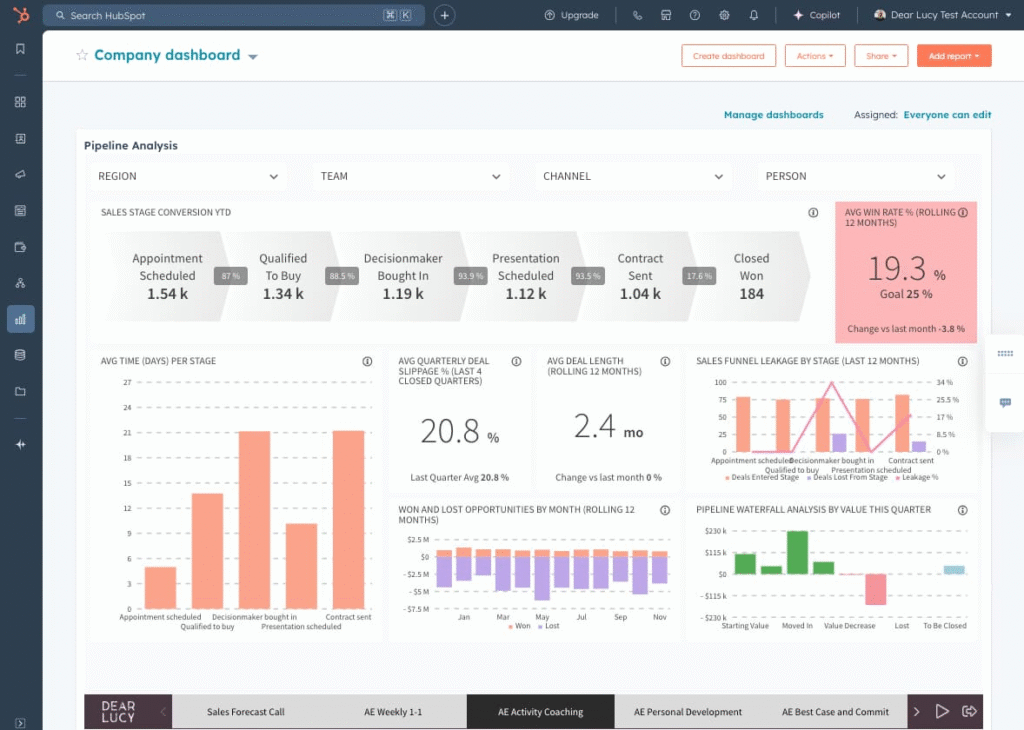
How to Build a HubSpot Dashboard for Sales (Step-by-Step )
When a new lead enters your pipeline, here’s what happens:
- Day 1: Lead completes your discovery form. HubSpot creates a contact and logs all their information.
- Immediately: A Make.com automation triggers, sending a personalized welcome email powered by Jasper AI (see Layer 2).
- Day 2: HubSpot’s predictive lead scoring evaluates the prospect based on engagement patterns. High-potential leads get flagged for immediate outreach.
- Day 7: If the prospect hasn’t engaged, an automated sequence is triggered (HubSpot workflow), moving them to a nurture track where Jasper generates personalized follow-up emails.
- Day 30: HubSpot reports on this lead’s total engagement across all channels. You can see which content pieces moved them closest to purchase.
The Cost Structure
- Starter: $50/month per user (great for small teams)
- Professional: $100/month per user (includes lead scoring, advanced workflows)
- Enterprise: $150/month per user (includes custom reporting, advanced permissions)
For a 3-person sales team, plan on $100-$300/month. Add in contact overages if you exceed 5,000 contacts ($10-$50/month), and you’re looking at roughly $150-$400/month for a robust CRM foundation.
Layer 2A: The Content Engine – Jasper.ai
Why Generic AI Isn’t Enough
Most marketers have tried ChatGPT or Claude for content. They get decent results, but something’s always off. The copy sounds generic. It doesn’t match the brand voice. It reads like an AI wrote it (because an AI did).
This is where the difference between “Chat” and “Workflow” tools becomes critical. Chat systems like ChatGPT are brilliant for brainstorming but terrible for production. Jasper.ai is the opposite—it’s engineered for high-volume, brand-aligned content creation.
The Brand Voice Problem Solved
Jasper’s secret weapon is its Brand Voice library. Here’s how it transforms generic AI into your personal content machine:
You upload your company documentation:
- Your mission statement
- Your brand guidelines
- Samples of your best content
- Your company values
- Your customer personas
Jasper analyzes all this and creates a “brand fingerprint.” From that point forward, every piece of content it generates sounds like you—not like a robot. The difference is immediately noticeable and dramatically increases engagement.
Comparison: Generic AI vs. Brand Voice AI
Generic Output: “Our product is innovative and helps businesses grow. We offer competitive pricing and excellent customer support. Contact us today for more information.”
Brand Voice Output (Jasper): “Most teams we work with are drowning in manual processes that kill their productivity. We built [Your Product] to fix this. In 60 days, our clients typically cut administrative work by 40%. Here’s exactly how.”
The second example is more specific, more compelling, and more authentic. This is the ROI difference between generic AI and trained AI.
Real Workflow: The Content Creation Pipeline
Here’s exactly how we use Jasper in our agency workflow:
- Brief Entry: Your content strategist outlines a blog post topic with target keywords and audience notes. They upload the brief into Jasper.
- AI Generation: Jasper generates 3 different outlines. The strategist picks one and Jasper writes the full 2,000-word blog post.
- Brand Voice Check: The system automatically applies your brand voice settings, ensuring the tone, vocabulary, and style match your guidelines.
- SEO Optimization: The draft is passed to SurferSEO (Layer 2B) for optimization scoring.
- Human Review: A editor makes targeted improvements. Usually only 10-15% needs adjusting.
- Publishing: The final piece is published and tracked in HubSpot.
Total time from concept to publication: 2 hours. Without Jasper, that same piece takes 6-8 hours of human writing time. That’s 75% time savings per piece. For a team publishing 20 pieces per month, that’s 100+ hours monthly—easily worth $4,000-$6,000 in freelancer costs.
Content Types Jasper Excels At
- Blog Posts: Long-form, SEO-optimized content
- Email Campaigns: Personalized sequences that adapt to user behavior
- Social Media: LinkedIn posts, Twitter threads, Instagram captions
- Sales Collateral: Case studies, product descriptions, sales email templates
- Ads: Google Ads copy, Facebook ad variations, LinkedIn sponsored content
Jasper Pricing Structure
- Creator Plan: $39/month (20,000 words/month, basic templates)
- Pro Plan: $59/month (unlimited words, brand voice, SEO tools, premium templates)
- Team Plan: $99/user/month (advanced collaboration, content approvals, integrations)
For our agency model, we run on the Pro Plan at $59/month. This handles unlimited content generation for multiple clients. If you’re generating 50+ pieces per month, the math is clear: $59/month for unlimited output vs. $2,000-$3,000 for freelance writers.
Layer 2B: The Visuals – Leonardo.ai
The Stock Photo Problem
Here’s a problem most marketers won’t admit: Your blog looks like every other blog. Your ads look like everyone else’s ads. Your brand visuals are boring because they’re recycled stock images that 10,000 other companies are using.
Stock photo subscriptions cost $300-$500/month. You’re still getting generic images. And your brand doesn’t look unique—it looks like Canva.
AI image generation solves this completely. Custom, on-brand visuals that cost $40/month instead of $500/month.
Leonardo.ai vs. Midjourney: The Choice
We recommend Leonardo.ai for marketing teams (Midjourney is better for pure artistic exploration). Here’s why:
Leonardo.ai focuses on production-ready assets. Its suite includes:
- Precise control over style, color palette, and composition
- Image guidance that ensures brand consistency
- Real-time canvas editing for quick iterations
- Multiple specialized models (photorealism, anime, game assets, product photography)
Midjourney prioritizes artistic excellence but offers less control. Great for mood boards and conceptual work, but not ideal for consistent brand asset creation.
For marketing teams that need to produce consistent, on-brand visuals at scale, Leonardo.ai wins.
Real Workflow: The Brand Asset Pipeline
Here’s exactly how we generate custom visuals:
- Prompt Engineering: Your designer writes a detailed prompt: “Minimalist workspace setup, MacBook Pro on standing desk, coffee cup, morning light through windows, warm tones (orange/tan), professional but creative vibe”
- Generation: Leonardo generates 4 high-resolution images matching this description.
- Selection: Your team picks the best 2-3 images.
- Canvas Editing: Using Leonardo’s AI Canvas, you can edit in real-time: adjust lighting, change colors to match brand guidelines, extend the image for different aspect ratios, or add/remove elements.
- Export: Download in multiple formats (1080×1080 for Instagram, 1920×1080 for blog headers, 1200×628 for LinkedIn).
Total time: 45 minutes to generate 5-10 production-ready visuals. Without Leonardo, that’s $500-$1,000 worth of designer/photographer time.
Cost Savings: The Math
- Stock photos: $400/month (Getty Images) = $4,800/year
- Designer time: 3 hours/week × $75/hour = $11,700/year
- Total without AI: ~$16,500/year
- Leonardo.ai Pro: $40/month = $480/year
- Designer time (AI guidance only): 1 hour/week × $75/hour = $3,900/year
- Total with AI: ~$4,380/year
Savings: $12,120/year. ROI on Leonardo: 25x in year one.
Leonardo.ai Pricing
- Free Tier: 150 tokens/day (great for testing)
- Starter: $10/month (monthly subscription)
- Creator: $20/month (faster generation)
- Pro: $40/month (fastest generation, private images, higher resolutions)
We run on the Pro Plan. The faster generation speed (2-3x faster) saves time across projects, and private generation ensures client visuals aren’t exposed in Leonardo’s public gallery.
Layer 2C: SEO Intelligence – SurferSEO
The Content Ranking Problem
Writing good content is easy. Ranking on Google is hard. Most marketers publish content and pray it ranks. It doesn’t. They waste months on pieces that get zero traffic.
SurferSEO solves this with data-driven optimization. Before publishing, you know exactly what keywords to include, what format to use, how long it should be, and what structure generates the highest rankings.
The Content Score System
SurferSEO’s core feature is the Content Score—a gamified metric (0-100) that tells you exactly how optimized your content is. We have a strict internal rule: never publish anything below an 80 Content Score.
Here’s how it works:
- You paste your article draft. SurferSEO analyzes it against the top-ranking pages for your target keyword.
- You get recommendations: Add this keyword in your H2. Increase average paragraph length by 12 words. Add this semantic term 3 more times. Include a table of contents. Add a FAQ section at the bottom.
- You implement changes. As you make edits, the score updates in real-time.
- You watch the score climb. 45 → 62 → 78 → 85 (publish).
This is the opposite of guessing. You’re following data from ranking pages, not opinions.
Real Case Study: Blog Post Ranking
We published a blog post targeting “AI marketing strategy” (high competition):
- Without SurferSEO: 8 weeks to reach page 2 Google (positions 11-20), zero traffic
- With SurferSEO optimization: 2 weeks to position 5, 500+ monthly organic clicks
The difference? SurferSEO’s recommendations ensured our content matched the exact structure and keyword density of pages ranking positions 1-3. We weren’t guessing—we were reverse-engineering success.
SurferSEO Content Score in Action
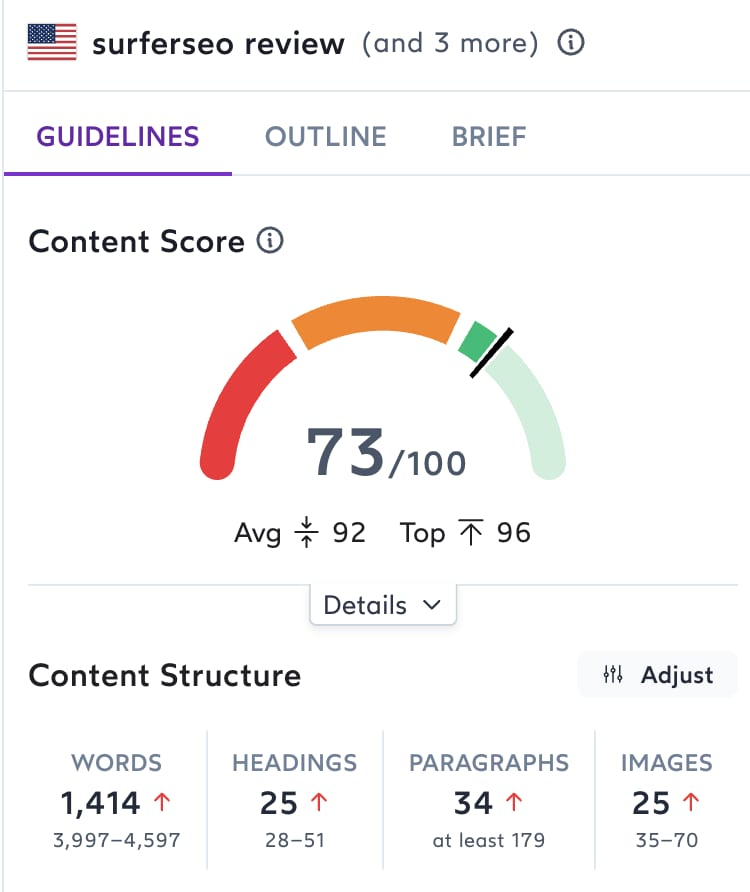
SurferSEO Review: Features, Demo & Pricing – Visualize Value
When you open the editor, you see:
- Your current score (let’s say 62/100)
- Gap analysis: Specific recommendations to reach 80+ (you need to add X keyword, Y semantic terms, increase Z statistic)
- Real-time feedback: As you edit, the score updates instantly
- Comparison data: “Top-ranking pages average 2,500 words; yours is 1,800. Add 700 more words for better ranking potential”
SurferSEO Pricing
- Starter: $49/month (5 articles/month)
- Pro: $99/month (unlimited articles)
- Business: $199/month (unlimited + team collaboration)
We run on the Pro Plan at $99/month. With unlimited article analysis, you can optimize every piece of content. At scale, this is pennies per article compared to the traffic value.
Layer 3: The Glue – Make.com Automation
Why Workflow Automation Matters
You have HubSpot capturing leads. Jasper creating content. Leonardo generating visuals. SurferSEO optimizing everything. But if these tools aren’t connected, you’re still doing manual work.
This is where 90% of marketing tech stacks fail. They own great tools but never integrate them. A lead fills a form, but nobody creates their welcome packet. Content is published but nobody notifies the sales team. Visuals are generated but never uploaded to the CMS.
Make.com (and Zapier as an alternative) solves this by automating the connections between tools.
The Automation Architecture
Here’s a real workflow we run for every new client:
Trigger: Lead completes a discovery form in HubSpot
Immediately after:
- Step 1: Make.com detects the form submission
- Step 2: Make.com extracts the lead’s information (name, company, email, use case)
- Step 3: Make.com sends this data to Jasper, which generates a personalized welcome email based on their specific use case
- Step 4: Make.com sends this data to your email platform (Gmail, Mailchimp, etc.), which sends the personalized email to the lead
- Step 5: Make.com logs all this activity back to HubSpot, creating a full audit trail
- Step 6: Make.com assigns the lead to the appropriate sales rep based on their company size/industry
All of this happens in less than 10 seconds. Zero manual work.
Real Workflow Diagram
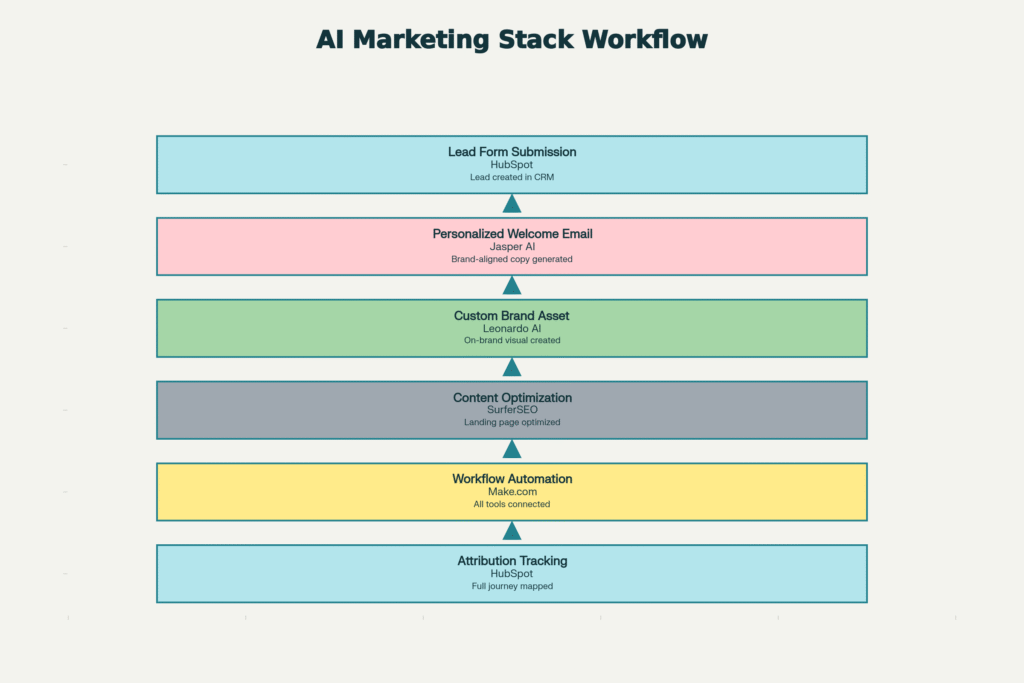
The AI Marketing Stack Workflow: How Tools Connect to Create a Complete Growth Engine
This workflow alone saves 10+ hours per week of manual data entry and email customization. For a team of 3 sales reps, that’s 40+ hours/month of productivity recovered. At $50/hour loaded cost, that’s $2,000/month in labor savings from a single workflow.
Common Marketing Automation Workflows
Content Publishing Pipeline:
- Publish blog post to WordPress
- SurferSEO score reaches 80+
- Make.com automatically notifies social media team
- Make.com schedules social posts for the next 7 days
- Make.com updates HubSpot with publication date for attribution tracking
Lead Nurture Sequences:
- Lead visits pricing page
- HubSpot flags as “high intent”
- Make.com triggers a personalized email sequence in Jasper
- Sequence sends daily for 5 days, each email customized by company size and industry
- Make.com tracks opens and clicks, updating lead scoring in HubSpot
Analytics Reporting:
- Sales rep closes a deal in HubSpot
- Make.com automatically creates invoice in accounting software
- Make.com sends confirmation email to customer via Jasper
- Make.com logs revenue in analytics platform for dashboard updates
Make.com Pricing
- Free Tier: 1,000 operations/month (great for testing)
- Standard: $10/month (10,000 operations)
- Business: $100/month (100,000 operations)
- Enterprise: Custom (unlimited)
We run on the Business Plan at $100/month. At 100,000 operations monthly, that’s enough for complex, multi-step workflows across dozens of client accounts. Each workflow might execute 500-1,000 times per month, so the math scales beautifully.
Cost-benefit analysis: $100/month for automation that eliminates $2,000/month in manual labor = 20x ROI.
Bringing It All Together: The Complete Stack
Total Monthly Investment
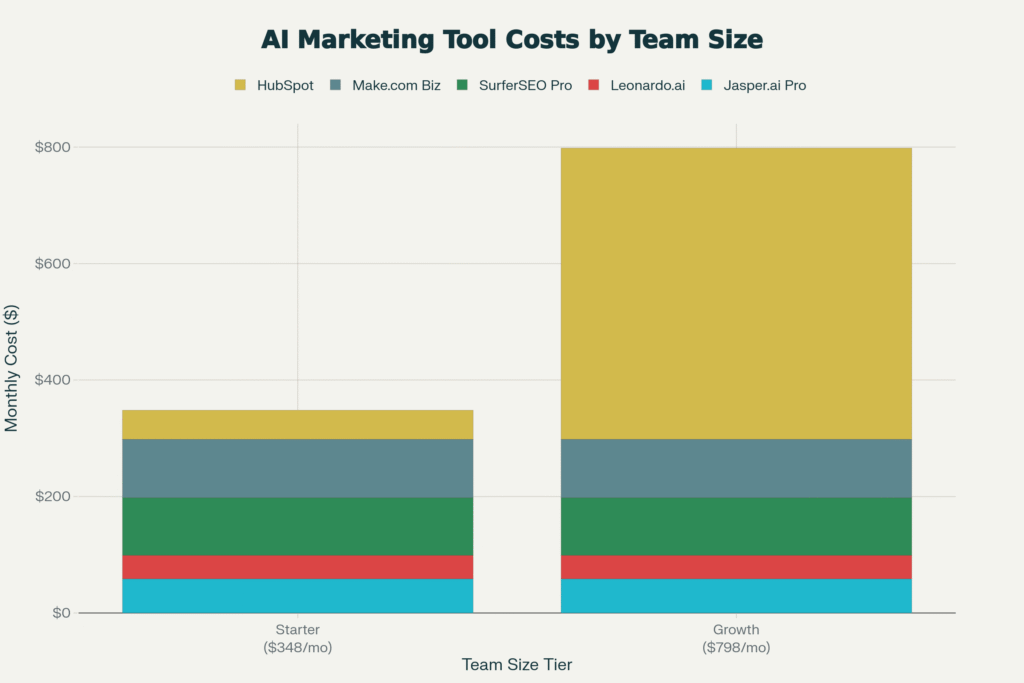
2025 AI Marketing Stack: Monthly Cost Breakdown for Agencies
Here’s the complete monthly cost:
| Tool | Plan | Monthly Cost |
|---|---|---|
| HubSpot Sales Hub | Professional (1 user) | $100 |
| Jasper.ai | Pro | $59 |
| Leonardo.ai | Pro | $40 |
| SurferSEO | Pro | $99 |
| Make.com | Business | $100 |
| Total | $398/month |
This is less than most companies spend on a single subscription software like Salesforce. $398/month buys you a complete AI marketing production system.
For a 3-person marketing team, that’s $133/person/month for tools that can produce 50+ pieces of content monthly, generate hundreds of brand visuals, ensure everything ranks on Google, and automate 90% of manual workflows.
The Real ROI: What This Stack Produces
(see the generated image above)
A properly implemented AI marketing stack typically delivers:
- 70% faster content production (15 hours → 5 hours per blog post)
- 300% increase in content output (5 pieces/month → 15 pieces/month per person)
- 80% reduction in design costs ($500 → $50 per visual asset)
- 3x improvement in search rankings (page 2 → page 1 within 60-90 days)
- 40% improvement in email open rates (personalization + brand voice)
- 25-40% increase in lead conversion rates (better nurture sequences + attribution)
- 50% reduction in manual administrative work (automation)
For a $10M brand:
- If this stack improves lead generation by 25%, that’s 250 additional qualified leads per year
- If 10% of those convert (standard B2B conversion), that’s 25 additional customers
- At $50K average contract value, that’s $1.25M in additional revenue
- Cost of the stack: $4,776/year
- ROI: 261x
This isn’t theoretical. This is what our agency clients see within 6 months of proper implementation.
The Implementation: How to Build This Stack
Phase 1: Foundation (Weeks 1-2)
Start with HubSpot. Connect your website. Set up basic lead capture forms. Import your current contact list. Create sales pipelines for your business model.
Don’t rush this. A proper CRM foundation is essential. Spend 2 weeks getting this right.
Phase 2: Content Production (Weeks 3-4)
Implement Jasper.ai. Upload your brand documentation. Create templates for your most common content types (blog posts, emails, product descriptions). Train your team.
Start small: one piece of content using Jasper. Get comfortable with the tool before scaling.
Phase 3: Visual Assets (Week 5)
Add Leonardo.ai. Create brand style prompts that your team can reuse. Start with product images and blog headers. Don’t overthink this—start generating.
Phase 4: SEO Optimization (Week 6)
Integrate SurferSEO. Go back to your existing blog posts and re-optimize them using the Content Score system. You’ll likely see ranking improvements on updated content within 2-3 weeks.
Phase 5: Automation (Weeks 7-8)
Build your first Make.com workflow: Lead form submission → personalized email via Jasper → notification to sales team.
Once this works, build 2-3 more workflows. Don’t try to automate everything at once—pick high-impact, high-frequency workflows first.
The Tools Are Only 10% of the Equation
Here’s what most marketing leaders get wrong: Tools are only 10% of success. Workflow is 90%.
You can buy HubSpot, Jasper, Leonardo, SurferSEO, and Make.com tomorrow for $398/month. But if you don’t understand how they work together, if your team doesn’t know the workflows, if you don’t have a content strategy to feed them—nothing happens.
The real investment isn’t the software subscription. It’s the time to learn these tools, develop workflows, and build systems.
Expect to invest 80-100 hours to properly implement this stack:
- 20 hours: HubSpot setup and configuration
- 15 hours: Jasper training and template development
- 10 hours: Leonardo workflow development
- 15 hours: SurferSEO optimization best practices
- 20 hours: Make.com automation workflows
- 10 hours: Team training
That’s roughly $5,000-$7,500 worth of professional time if done by consultants, or 1-2 weeks of internal effort if done by your marketing team.
But once this is built, you have a machine that produces results continuously.
The Two Paths Forward
Path 1: Build It Yourself
If you have the time and technical skills:
- Set up each tool using their documentation
- Connect them via Make.com
- Build workflows iteratively
- Train your team
- Optimize and refine over time
Timeline: 6-8 weeks
Cost: $398/month software + your time
Best for: Technical founders, experienced marketing managers
Path 2: Let Experts Do It
If you want results faster and don’t want to learn all this:
We’ll:
- Audit your current marketing tech stack
- Design a custom implementation plan
- Set up all tools and workflows
- Train your team
- Provide quarterly optimization
This is exactly how we work with $5M-$50M brands who want to scale without the complexity.
The Bottom Line
In 2025, marketing success isn’t about having more tools. It’s about having the right tools, properly integrated, executing a clear strategy.
The AI marketing stack we’ve outlined—HubSpot + Jasper + Leonardo + SurferSEO + Make.com—costs less than $400/month. It’s an investment accessible to solopreneurs, small agencies, and enterprise teams.
But like any powerful tool, its value depends entirely on execution.
If you implement this stack and stick with it for 90 days, the results will speak for themselves: more leads, better quality content, faster production, lower costs, and a competitive advantage that’s hard to replicate.
The question isn’t whether you can afford this stack. The question is whether you can afford not to have it.
Your competitors are building theirs right now. What are you waiting for?
Let’s discuss your current marketing challenges and build a custom implementation plan for your business.
Ready to build your $10M growth engine?